Generating a class schedule generator
To generate class schedules:
1. Expand the “Settings” tab.
2. Then select “Classes”.
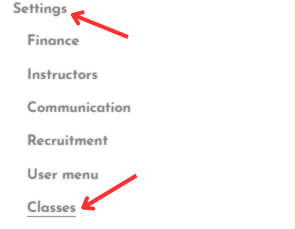
3. Go to the “Schedule generator” tab.
4. Select:
- Facility
- Instructor
- Start date and end date
5. Then click “Generate schedule” to generate the schedule grid or “Generate weekly calendar” to generate the weekly plan.
Related Articles
Sending welcome messages
Unlike other automatic messages, this message is not sent automatically. Its delivery depends on the administrator’s decision, who can trigger it manually by clicking the “Send welcome message” button in the “Communication” tab on the group page. It ...History of sent messages
In the Communication tab on the group page, all messages sent to participants of a given class group are visible, including welcome messages.Adding an image consent
The Mondo Infano platform allows you to attach an image consent directly to the class registration form. To add an image consent: 1. Expand “Settings” from the side menu. 2. Then select “Recruitment”. 3. Next, open the “Consents and documents” tab. ...Adding documents to a promoter
To add documents to a promoter: 1. Expand the “LUDO” tab from the side menu. 2. Then expand the “Administration” tab. 3. Select the “Promoters” tab. 4. From the list of promoters, select the desired promoter by clicking their name. 5. Go to the ...Selecting a territorial division
To select a territorial division: 1. Expand the “LUDO” tab from the side menu. 2. Then expand the “Administration” tab. 3. Select “Settings”. 4. Go to the “Territorial division” tab. 5. Choose a territorial division from the list. 6. Click the “Save” ...