Selecting a territorial division
To select a territorial division:
1. Expand the “LUDO” tab from the side menu.
2. Then expand the “Administration” tab.
3. Select “Settings”.
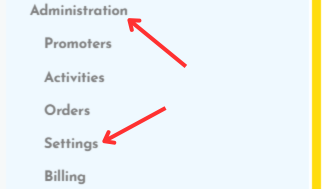
4. Go to the “Territorial division” tab.
5. Choose a territorial division from the list.
6. Click the “Save” button.
Related Articles
Setting up the menu
To set up a menu for users: 1. Expand the “Settings” tab from the side menu. 2. Then select “User menu”. 3. Click the “Add user menu” button. 4. Fill out the form and save it. NOTE: The menu will be available to users after selecting the appropriate ...Adding documents to a promoter
To add documents to a promoter: 1. Expand the “LUDO” tab from the side menu. 2. Then expand the “Administration” tab. 3. Select the “Promoters” tab. 4. From the list of promoters, select the desired promoter by clicking their name. 5. Go to the ...Adding a product
To add a product: 1. Expand the “LUDO” tab from the side menu. 2. Then expand the “Administration” tab. 3. Select “Settings”. 4. Go to the “Product” tab. 5. Click the “Create product” button. 6. Fill out the form and save it.Defining training material types
To add a new training material type: 1. Expand the “LUDO” tab from the side menu. 2. Then expand the “Administration” tab. 3. Select “Settings”. 4. Open the “Material types” tab. 5. Click the “New material type” button. 6. Fill in the form and save ...Adding a season
To add a season: 1. Expand the “LUDO” tab from the side menu. 2. Then expand the “Administration” tab. 3. Select “Settings”. 4. Go to the “Seasons” tab. 5. Click the “Add a season” button. 6. Fill out the form and save it.