Message creation
Mondo Infano includes a built-in communication module that allows you to send messages via email and SMS.
To send a message:
1. Expand the “Communication” tab from the side menu.
2. Then select “Inbox”.
3. Click the “New message” button.
3. Click the “New message” button.
NOTE:
1. In the “Recipient” field, search for and select the appropriate message recipient. The available options include:
- Any user – e.g. an instructor, salesperson, or participant (Active Preschooler).
- Participant’s parents – in this case, enter the participant’s first and last name, then select the option labeled “First name and last name (Parents)”.
- Class group – simply enter the group name, and the message will be sent to the parents of all participants assigned to that group.
2. In the “Subject” field, enter the message subject – it will also appear as the email subject.
3. In the “Content” field, enter the actual message content. If you want to use dynamic placeholders (e.g. {student_lastname_firstname}, {student_identifier}), you must select the Participant as the recipient, not the Parent.
4. Select the message delivery method by choosing one of the following options:
- Send as email
- Send as SMS
If the message is to be sent as an SMS, the system will allow you to estimate its cost in SMS credits. To use this option, the SMS account must be topped up in advance.
5. For email messages, you can add attachments that will be sent together with the message.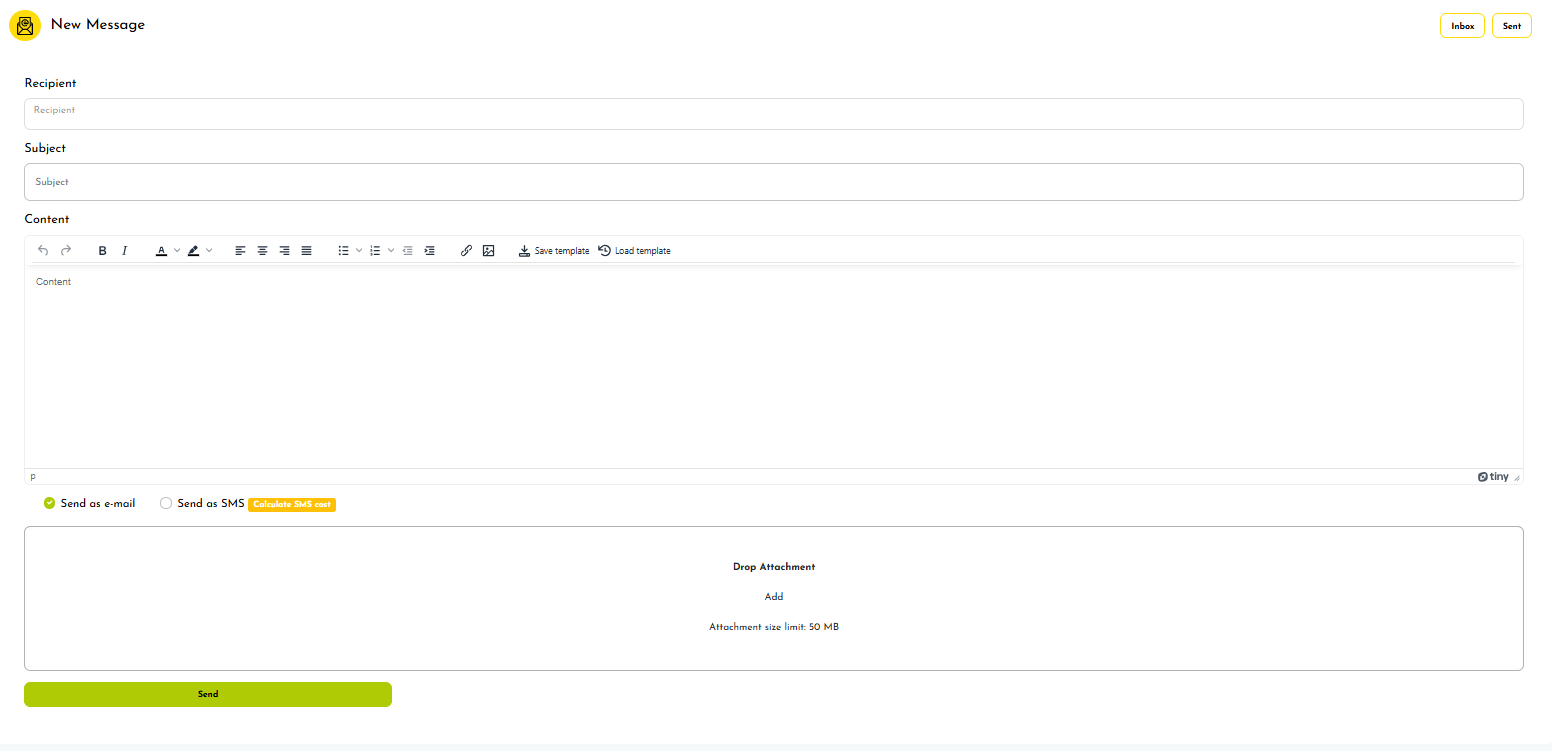
Related Articles
Message templates
In the message creation module, you can use saved templates to make your work easier and faster. To save a message as a template, click the “Save template” button in the editor and give the template a name. When you want to use a previously created ...SMS cost calculation
To display the SMS cost: 1. Go to the new message creation screen. 2. Click the “Calculate SMS cost” button. 3. The number of credits will be displayed (indicating how many parts the message will be sent in). Next to the credit count information, ...Sending a welcome message to a selected user
To send a welcome message to a specific user: 1. Expand the “LUDO” tab from the side menu. 2. Select the “Groups” tab. 3. From the list of groups, select the group you are interested in and click its name. 4. Select the “Participants” tab. 5. Go to ...Adding documents to a promoter
To add documents to a promoter: 1. Expand the “LUDO” tab from the side menu. 2. Then expand the “Administration” tab. 3. Select the “Promoters” tab. 4. From the list of promoters, select the desired promoter by clicking their name. 5. Go to the ...Selecting a territorial division
To select a territorial division: 1. Expand the “LUDO” tab from the side menu. 2. Then expand the “Administration” tab. 3. Select “Settings”. 4. Go to the “Territorial division” tab. 5. Choose a territorial division from the list. 6. Click the “Save” ...